

HR Ready chronology
What is this?
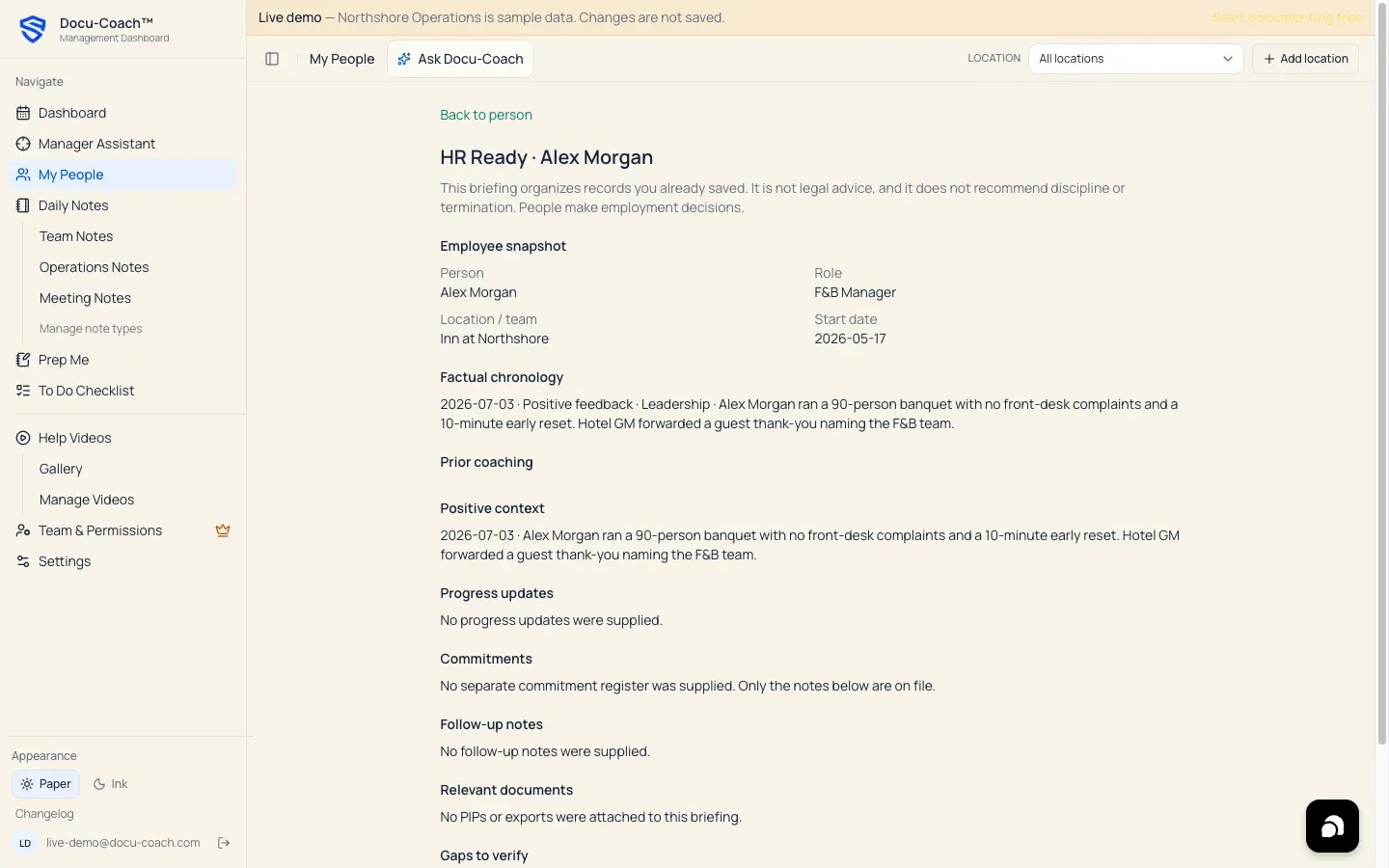
Section titled “What is this?”HR Ready (/admin/employees/[id]/hr-ready) compiles an organized, factual briefing for a single employee from their saved records, follow-up notes, and PIP cases. It structures everything HR or senior leadership typically asks for before a formal performance conversation or escalation—while keeping every line tied to a saved record.
When would I use it?
Section titled “When would I use it?”- Preparing to brief HR, an Area Director, or an owner on an employee’s history.
- Checking whether your documentation has any factual gaps (such as missing dates, missing follow-ups, or unreviewed context) before taking a formal management step.
Where is it?
Section titled “Where is it?”- Web Management Dashboard: Open My People → [Select Employee] (
/admin/employees/[id]) and open HR Ready (/admin/employees/[id]/hr-ready).
How do I use it?
Section titled “How do I use it?”- Go to My People and click the employee’s name to open their Employee Command Center.
- Open HR Ready (
/admin/employees/[id]/hr-ready). - Review each section of the HR Ready briefing:
- Employee snapshot: Name, Role, Primary location / team, and Start date.
- Factual chronology: Every saved record in date order with links back to the source record.
- Prior coaching: Documented incident and coaching records.
- Positive context: Documented Positive feedback records so reviewers see the complete picture.
- Progress updates: Documented Progress update records.
- Commitments: Expectations and commitments noted in the record history.
- Follow-up notes: Dated entries from
incident_follow_ups. - Relevant documents: Linked PIP cases and their current status.
- Gaps to verify: Automated checks highlighting what may be missing (for example, if no follow-up notes or progress updates are on file yet).
- Manager prep: Practical reminders for reviewing the file with HR.
- Click Back to person at the top of the page to return to the Employee Command Center (where you can also export the timeline to Word or PDF).
What happens after I do it?
Section titled “What happens after I do it?”- Like Prep Me, HR Ready runs Docu-Coach™’s deterministic compiler directly over your stored database records. It never invents events, never alters the employee’s timeline, and clearly notes that the briefing organizes saved records and is not legal advice.
Permissions, plans, and platform limitations
Section titled “Permissions, plans, and platform limitations”- Available on all plans: Viewing the in-app HR Ready chronology is available on Free, Manager, and Teams. (Exporting Word
.docxand PDF files from the Employee Command Center requires the Manager or Teams plan, or an active 30-day Manager trial.)
What can go wrong?
Section titled “What can go wrong?”- A recent incident does not appear in Factual chronology: Verify that the incident was assigned to this employee rather than left Unassigned.