

Dates & backdating captures
What is this?
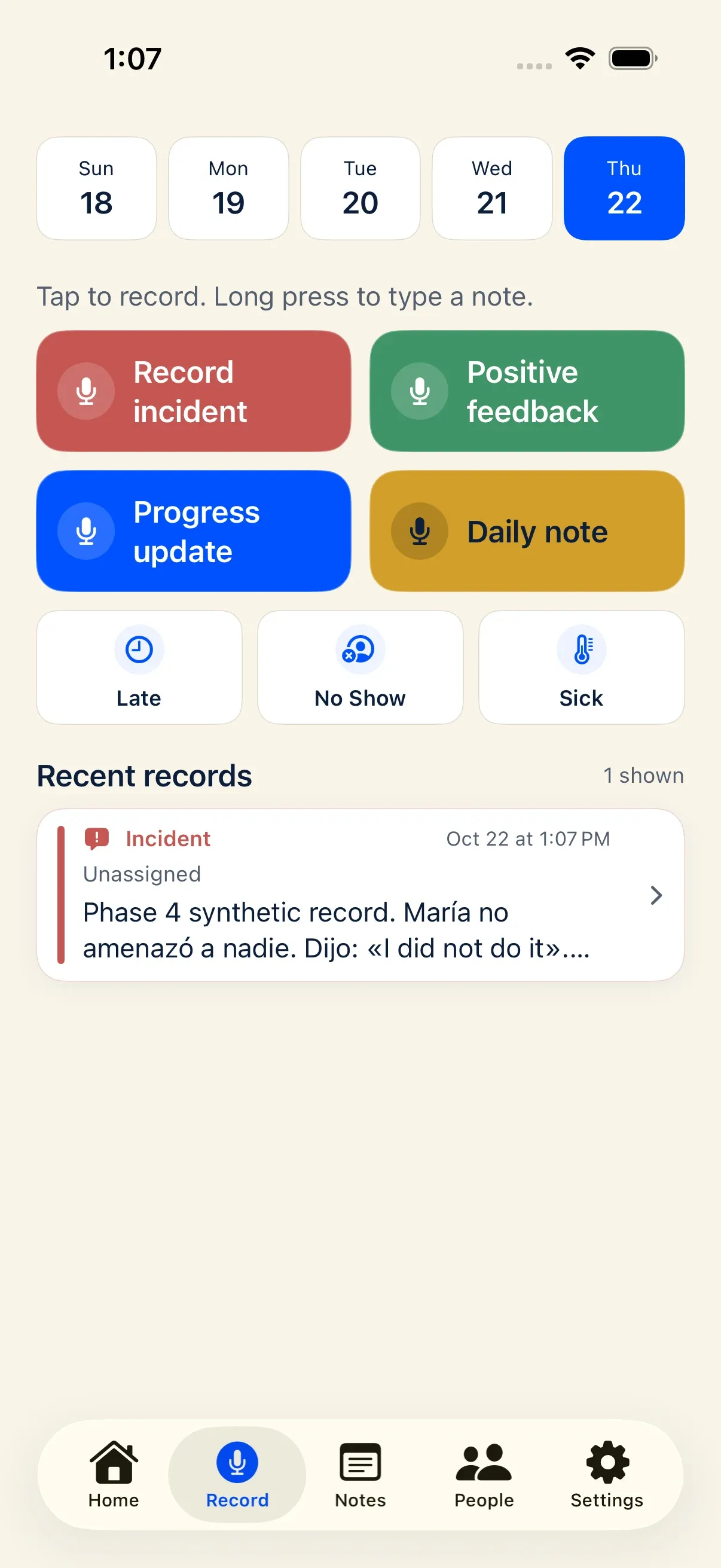
Section titled “What is this?”Managers cannot always document an event the minute it happens. The Record calendar strip lets you select today or a recent preceding day before you start a capture so the saved record’s timestamp reflects the day the event occurred.
When would I use it?
Section titled “When would I use it?”- You had a coaching conversation on Friday evening and are recording your note on Saturday morning.
- You are catching up on a pre-shift huddle note or attendance event from earlier in the week.
Where is it?
Section titled “Where is it?”- iPhone app: The fixed 5-day date strip at the very top of the Record tab, showing today and the four preceding local days sized to fit your screen without horizontal scrolling.
- Web recorder (
/record): The date bar above the capture controls on the floor recorder. - Android companion (
testing): The Earlier / Today / Later log-day selector on the Record screen.
How do I use it?
Section titled “How do I use it?”- On the Record screen, look at the date cards at the top of the screen. Today’s date is selected by default (highlighted in primary blue).
- Tap one of the preceding days in the strip to select that date.
- Start your capture:
- Tap a button for voice capture
- Long-press a button for typed capture
- Tap Late, No Show, or Sick for attendance
- Save the record as usual.
What happens after I do it?
Section titled “What happens after I do it?”- Today vs. earlier days:
- When today is selected, Docu-Coach™ uses the exact instant you started or saved the capture.
- When an earlier day is selected, Docu-Coach™ sets the record’s timestamp (
created_at, oroccurred_onfor attendance) to 12:00 PM (local noon) on that local calendar date so daylight saving time and timezone boundaries never shift your note onto the wrong day.
- Audio jobs freeze the selected date at recording start: If you select an earlier date and tap to record audio, that chosen date is locked into the upload job—even if the upload finishes later after you reconnect to Wi-Fi.
- Task extraction preserves capture timezone: When AI extracts follow-up tasks from a note with relative dates (such as “by Friday”), Docu-Coach™ resolves weekday expressions deterministically in your capture timezone.
Permissions, plans, and platform limitations
Section titled “Permissions, plans, and platform limitations”- Window limit: On the iPhone app, the fixed date strip displays today and the 4 preceding local days (5 days total). Dates older than the strip window cannot be selected for a new capture.
- Saved dates are not editable: Once a record is saved, its occurred/created timestamp is fixed. If you need to reference an older historical event in a new note, mention the specific historical date in the body of your note.
What can go wrong?
Section titled “What can go wrong?”- Forgot to switch the date back to Today: Check the highlighted blue date card at the top of the Record screen before starting your next recording.