

Manager Assistant & HR Center
What is this?
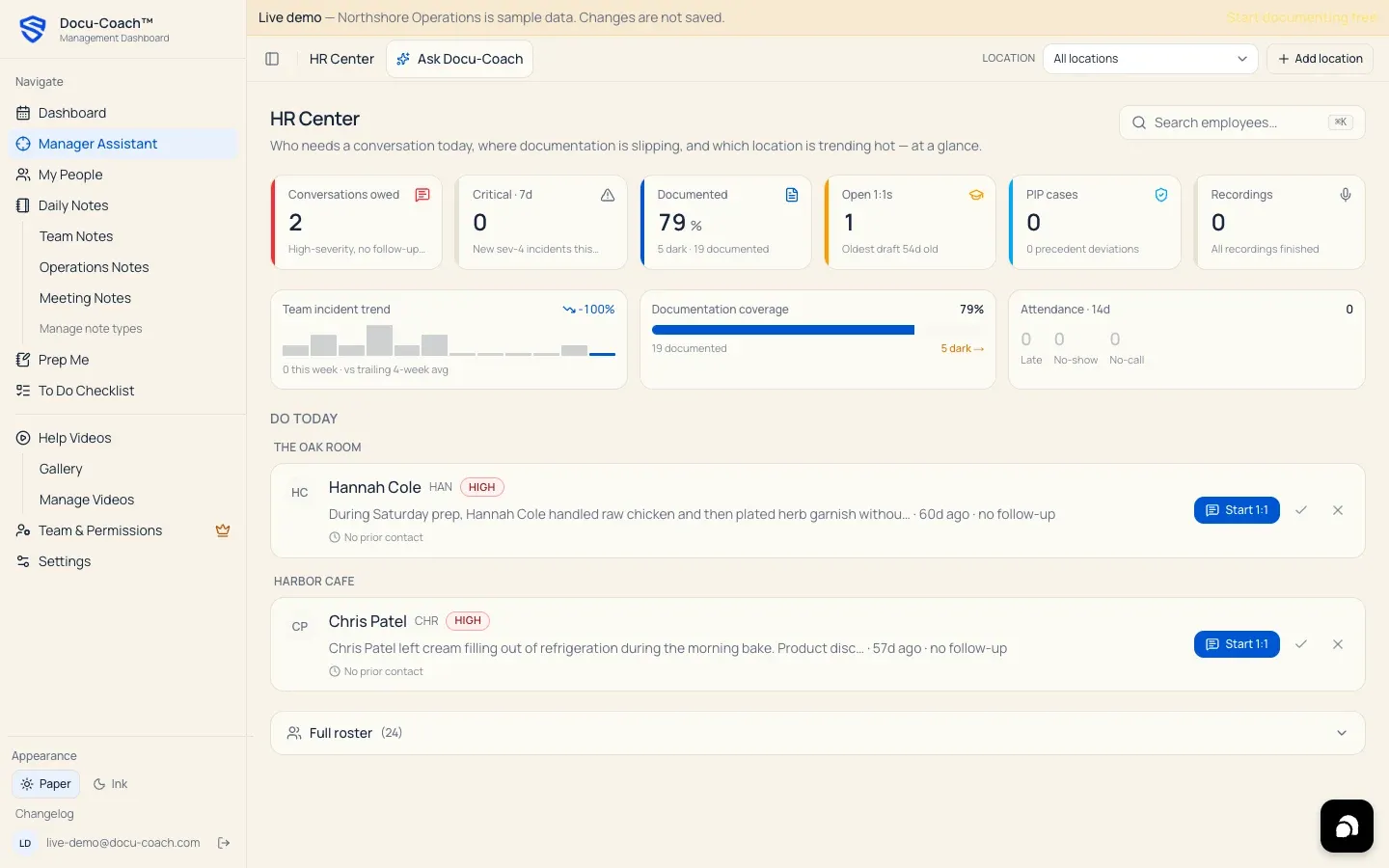
Section titled “What is this?”Manager Assistant opens the HR Center (/admin/command-center)—an operational triage screen that answers three questions at a glance:
- Who needs a conversation today?
- Where is documentation slipping across my team?
- Which location or PIP case needs attention right now?
When would I use it?
Section titled “When would I use it?”- Starting your shift or week to see which high-severity incidents still need a logged follow-up conversation.
- Checking your team’s documentation coverage percentage (how many active employees have documented history vs. “dark” roster profiles with zero records).
- Monitoring open 1:1 coaching drafts, active PIP cases, check-ins due, and recordings awaiting review or assignment.
Where is it?
Section titled “Where is it?”- Web Management Dashboard: Click Manager Assistant in the left sidebar (
/admin/command-center). - iPhone app (Home tab): The Home tab on iPhone mirrors your organization’s high-level insights, four-week note activity, and team documentation coverage.
How do I use it?
Section titled “How do I use it?”1. Scan the six KPI tiles (“The Blink”)
Section titled “1. Scan the six KPI tiles (“The Blink”)”Click any KPI tile to filter the Do today action queue below it (click the tile again or click Clear filter to reset):
- Conversations owed: High-severity incidents with no follow-up logged yet.
- Critical · 7d: New severity-4 incidents in the past 7 days (plus any employees at a final-warning threshold).
- Documented (%): Percentage of active employees with documented records, showing how many employees are documented vs. “dark” (0 records). Clicking this tile when dark profiles exist scrolls to and opens the Full roster table.
- Open 1:1s: Coaching session drafts waiting to be completed, including the age of the oldest draft.
- PIP cases: Active PIPs and cases needing HR review or upcoming check-ins.
- Recordings: Captures that need transcript review or employee assignment.
2. Review the Team Health Strip (“The Scan”)
Section titled “2. Review the Team Health Strip (“The Scan”)”Below the KPI tiles, the Team Health Strip summarizes your positive-to-incident balance, location comparisons (for multi-location organizations), and documentation gaps.
3. Work through the “Do today” Action Queue (“The Drill”)
Section titled “3. Work through the “Do today” Action Queue (“The Drill”)”Each card in the Do today queue links directly to the employee’s Employee Command Center (/admin/employees/[id]) or recording so you can log the follow-up, complete the 1:1, or finish the PIP check-in immediately.
4. Expand the Full Roster
Section titled “4. Expand the Full Roster”Click the Full roster bar at the bottom of the page to inspect every active employee’s incident count, positive feedback count, last documented date, and status in one table.
What happens after I do it?
Section titled “What happens after I do it?”- Filtering by a Location in the top-right header scopes the HR Center KPIs, Team Health Strip, and Action Queue to that site—and preserves your
?location=filter as you drill into employee profiles.
Permissions, plans, and platform limitations
Section titled “Permissions, plans, and platform limitations”- Available on all plans: Manager Assistant / HR Center is available on Free, Manager, and Teams (scoped to the records your account is authorized to view).
What can go wrong?
Section titled “What can go wrong?”- HR Center shows an empty state: If your workspace has 0 active employees in My People, add or import your roster first so HR Center can calculate coverage and surface action items.